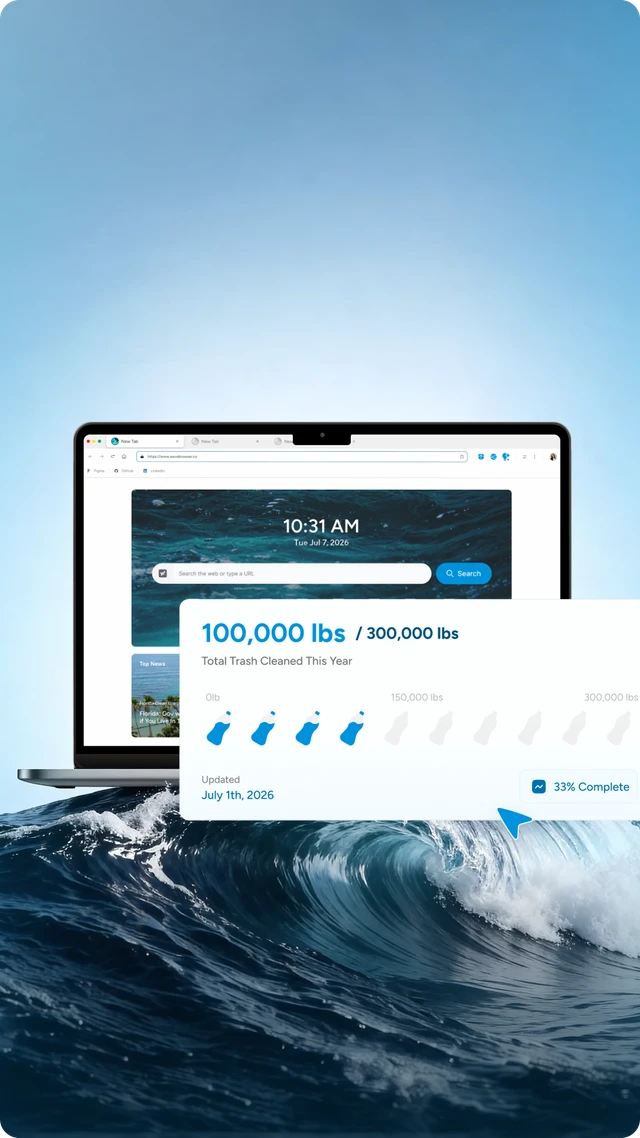
The way we browse the internet has a growing environmental footprint. Every page load, every background script, and every unnecessary request contributes to energy use across global data centers. As awareness around digital sustainability increases, tools like clean browsers are becoming part of the conversation.
Wave Browser reflects this shift by framing browsing as more than a routine activity. It highlights how everyday actions—like opening tabs, visiting sites, or searching for information—can be approached with greater efficiency while contributing to something beyond the screen.
This connection becomes clearer when clean browsing is viewed not only as a way to reduce unnecessary data load—through an ad blocker, a memory saver, and an energy saver—but also as part of a broader system of impact. With Wave, each browsing session helps fund the removal of plastic and trash from our ocean, rivers, and coastlines through its partnership with 4ocean.
In this model, efficiency and sustainability are linked.
A cleaner browsing experience reduces digital waste, while the browser itself supports real-world cleanup efforts. Wave’s long-term commitment to remove 300,000 pounds of trash by 2028 shows how everyday web activity can be connected to measurable environmental outcomes without changing how people browse.
What Is a Clean Browser?
A clean browser refers to a browsing experience designed to reduce unnecessary digital clutter and improve efficiency. This often includes:
- Content filtering to limit unwanted scripts and ads
- Control over site usage and background activity
- Reduced loading of mixed content sites and heavy resources
- Streamlined handling of DNS requests
Instead of loading everything by default, a clean browser focuses on intentional loading—only what’s needed.
This approach not only improves performance but also reduces energy consumption tied to excessive data transfer.
In practice, this can be supported by features like built-in ad blockers, memory saver tools that manage inactive tabs, and energy saver modes that reduce resource usage helping create a more efficient and balanced experience.
The Role of DNS in Clean Browsing

At the core of many clean browsing strategies is the domain name system (DNS).
Every time you visit a web address, your browser sends a request to a DNS server to resolve that address into an IP. These DNS requests happen constantly and optimizing them can make surfing the web more efficient.
Key DNS Concepts
- DNS filtering service: Blocks access to malicious domains or unwanted content sites before a connection is established. This helps reduce exposure to harmful or irrelevant content while also limiting unnecessary network traffic.
- DNS cache: Stores previous domain lookups locally, allowing the browser to resolve frequently visited sites faster without repeating the same DNS requests. This improves loading speed and reduces redundant data exchanges.
- Private DNS: Encrypts DNS traffic, adding a layer of privacy and control by preventing third parties from monitoring or altering DNS queries. It also helps protect against certain types of interception or manipulation.
- Secondary DNS: Acts as a backup server to maintain reliability. If the primary DNS server fails or slows down, the secondary DNS ensures continued access without interruption.
DNS Filtering as a Security Layer
A DNS filter works as a security filter, preventing access to:
- Malicious sites that may contain harmful code or exploits
- Phishing attempts designed to steal sensitive information
- Unsafe or mixed content sites that may compromise security or load unverified resources
Together, these components help create a more efficient, secure, and controlled browsing experience while reducing unnecessary network activity.
By limiting unnecessary traffic, DNS filtering contributes directly to cleaner, more sustainable browsing.
How Does a DNS Filter Work?
A DNS filter works by intercepting domain name requests and blocking access to harmful or unwanted websites. It enhances online safety by preventing users from visiting sites known for malware, phishing, or inappropriate content. This proactive approach contributes to a cleaner browsing experience and supports digital sustainability efforts.
A clean browser often rely on different types of filters depending on specific needs:
1. Content Filtering
Blocks ads, trackers, and unnecessary scripts before they load. This reduces page weight, speeds up loading times, and limits background data usage, contributing to a cleaner and more efficient experience. It also helps minimize visual clutter and reduces the number of third-party requests made while browsing.
2. Family Filter
Restricts access to inappropriate or unsafe content sites. Often used on shared devices, this type of filter helps create a safer digital environment for different users, especially in households or educational settings. It can be configured to block entire categories of content, making it easier to maintain consistent usage guidelines.
3. Custom Filters
Gives users more control by allowing them to create custom block lists based on specific domain names, categories, or preferences. This flexibility makes it easier to tailor the browsing experience to individual needs, whether the goal is improving focus, reducing distractions, or limiting access to certain types of content.
4. Security Filters
Focus on identifying and blocking malicious domains, phishing attempts, and suspicious activity. These filters help reduce exposure to common online threats while maintaining a smoother experience. By preventing harmful connections before they happen, they also reduce unnecessary data exchanges tied to unsafe or compromised sources.
Privacy, Security, and Sustainability

Clean browsing is not just about speed; it also plays an important role in reducing security risks and limiting unnecessary data exposure.
By improving how the browser handles:
- Browsing history and browser history
- Protection against unauthorized changes
- Filtering harmful or suspicious domain names
- Monitoring public IP exposure
Users gain greater control over how their data is used and how much unnecessary traffic is generated.
This matters for sustainability because more efficient browsing directly reduces digital overhead:
- Fewer background processes = lower energy consumption
- Reduced tracking = fewer data exchanges across networks
- Optimized loading = less demand on servers and infrastructure
Clean Browsing and Digital Sustainability
Digital sustainability focuses on reducing the environmental impact of our online activity, and clean browsing is a practical step in that direction.
Clean browsers contribute by:
- Minimizing unnecessary DNS requests
- Blocking resource-heavy scripts before they load
- Reducing reliance on constant background connections
- Encouraging more intentional and efficient site usage
Even small optimizations—such as using a DNS filtering service or enabling private DNS—can scale across millions of users. Over time, these incremental improvements help create a more efficient, lower-impact web ecosystem.
The Next Step: Smarter, More Intentional Browsing
For users exploring clean browsing, the next step is understanding their own habits:
- Which search engines they rely on
- How often they visit high-load social media platforms
- Whether their current setup includes security filters or custom filters
Clean browsing is less about restriction and more about awareness. By combining tools like content filtering, DNS filtering, and smarter DNS settings, users can create a browsing experience that is not only faster and safer, but also more efficient in how it uses digital resources.
The Role of Wave Browser
Wave Browser reflects this broader shift by connecting everyday browsing with a more efficient and impact-aware model of internet use. Through features that support cleaner performance and a mission that links browsing activity to verified ocean cleanup, it shows how small changes in how we browse can scale into meaningful outcomes.
As digital activity continues to grow, a clean browser offers a practical way to reduce unnecessary load on both devices and the wider internet—making each session more efficient, and part of a more sustainable web.