
A fast internet connection does not always guarantee a smooth online experience. Many users run a speed test expecting strong internet speed to solve every issue, only to still experience lag during video calls, online gaming, streaming, or large downloads. In many cases, the problem is not bandwidth alone: it is buffer bloat.
Bufferbloat happens when equipment stores too many data packets in network buffers for long periods instead of processing them in a timely manner. This creates high latency, packet delay variation, and undesirable latency that can affect everything from online games to interactive applications.
A bufferbloat test helps measure how your network behaves under heavy traffic and whether overly large buffers are causing delays across your network link, which can make your browser so slow even when internet speed appears fast.
What Is Bufferbloat?
Bufferbloat is a performance problem caused by oversized buffers inside hardware such as older routers, cable modems, wireless access points, and gateways. Instead of improving network throughput, a bloated buffer can actually reduce user experience by increasing latency and packet loss during heavy internet activity.
This often happens during:
- Large uploads or downloads
- Streaming multiple videos
- Cloud backups
- Online gaming sessions
- Video calls during rush hour traffic periods
Even if internet speed appears high on a standard internet speed test, long queues inside network hardware may still create noticeable lag.
How ISPs Affect Bufferbloat
An ISP, or Internet Service Provider, is the company that delivers internet access to your home or device. Bufferbloat is often linked to how ISPs manage internet traffic.
During heavy network usage, oversized data buffers can create delays that increase latency and cause lag during gaming, streaming, video calls, and browsing. Even with fast internet speeds, poor traffic management can make a connection feel slow and unresponsive.
Most popular ISPs do not typically offer their own dedicated bufferbloat testing tools for customers. Instead, users often rely on third-party tools or online resources to identify and diagnose issues within their networks.
What Causes Bufferbloat?
Several factors can contribute to network performance degradation caused by large buffers:
- Older routers with outdated queue management systems
- Poorly configured quality of service settings
- Network hardware using oversized buffers
- Heavy upload speeds saturating the connection
- Weak tcp congestion control handling
- Multiple connected devices competing for bandwidth
Some internet service provider equipment may also prioritize higher throughput over responsiveness, which can worsen higher latency during peak traffic periods.
Why Does Bufferbloat Matter?

Bufferbloat affects how responsive your internet connection feels, especially during real-time activities that rely on low latency.
For example, online games and video calls require data to move quickly with minimal delay. When network traffic increases and large cached queues build up, response times can rise dramatically.
This creates problems such as:
- Delayed voice communication
- Lag spikes in online gaming
- Slow loading times
- Interrupted streaming
- Poor performance monitoring results
- Reduced overall network throughput
One simple way to understand bufferbloat is to imagine emergency vehicles stuck in heavy traffic. Even if the road is still moving, too many cars slow everything down. The same thing happens with network traffic. When too many data packets build up inside large buffers, important information gets delayed, creating lag and slower response times.
This delay can make websites load slowly, video calls freeze, online games lag, and your browser feel less responsive. Even with fast internet speed, poor queue management can prevent users from browsing faster during busy traffic periods.
As more devices connect to the internet through smart homes, streaming platforms, cloud services, and wireless, managing network traffic efficiently becomes increasingly important for a smoother online experience.
What is the Bufferbloat Test?
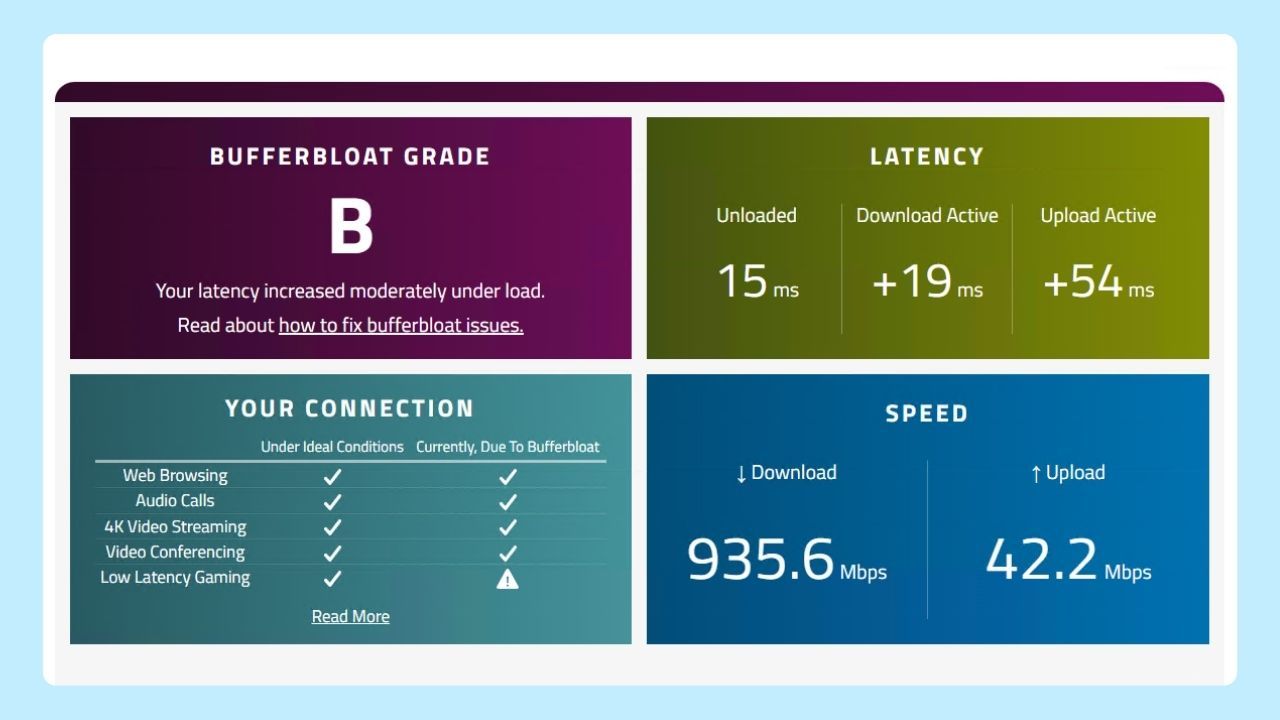
The Bufferbloat Test is a diagnostic tool that measures latency and network congestion issues caused by excessive buffering in routers. By assessing how well your internet connection handles data during peak traffic, it helps identify potential performance problems and ensures smoother online experiences for activities like gaming or streaming.
A test measures:
- Download and upload speeds
- Low latency performance
- Network throughput under load
- Packet loss during congestion
- Buffer size behavior during active traffic
Unlike a traditional internet speed test, a bufferbloat test evaluates how your connection performs while handling simultaneous network traffic.
How to Test Bufferbloat
To run a bufferbloat test, follow these steps:
- Close unnecessary apps and background downloads
- Connect directly to your router if possible
- Open a trusted testing tool
- Start the test and wait for the test results
- Review latency changes during download and upload activity
If latency increases significantly during heavy traffic, your network may be experiencing buffer bloat.
To accurately test for bufferbloat, several reliable online tools are available, with Waveform's Bufferbloat Test being among the most accurate and widely recommended by specialists.
For users on mobile devices or tablets, there are tests available—such as online speed tests with advanced diagnostics and specialized bufferbloat testing apps—that can help identify excessive latency and packet delays on these platforms.
How to Reduce Bufferbloat
The good news is that mitigation is possible with the right tools and settings.
Common solutions include:
- Upgrading outdated network equipment
- Enabling smart queue management features
- Using active queue management systems
- Adjusting quality of service controls
- Limiting unnecessary background traffic
- Monitoring network traffic patterns regularly
Modern smart queue management systems help prioritize important traffic and reduce long queues before they impact interactive applications.
For users who rely on stable connections for video calls, streaming, online gaming, or multitasking across multiple tabs, reducing latency often matters more than achieving the highest possible internet speed.
A smoother online experience depends not only on raw speed, but also on how efficiently your system handles traffic, tabs, and background activity. Wave Browser is built with features designed to support efficient gaming sessions and more responsive everyday browsing experiences.
Tools like Memory Saver and Energy Saver help reduce unnecessary resource usage during heavy browsing or multitasking, while built-in productivity and performance tools help users stay focused with fewer interruptions.
Gaming, streaming, researching, or multitasking across dozens of tabs can put extra strain on your system and performance. Wave helps browsing feel smoother, more organized, and more efficient during both gaming sessions and everyday web use.