In the world of web browsing, speed is king. The best web browsers are the fastest ones.
With a good internet connection, a fast browser should be able to load pages, execute JavaScript, and manage resources efficiently, and better your overall browsing experience.
In this blog post, we uncover the factors that influence browser speed and compare different popular browsers, known for their fast speeds based on key performance indicators such as compatibility, resource usage, operating system, JavaScript performance, and page load times. While anyone can check on a browser's speed using an internet speed test, there are other factors at play, too!
What Makes a Browser “fast”?
A browser feels “fast” when it can load pages quickly, stay responsive, and handle multiple tabs without slowing down your device. Speed isn’t just about how fast a single page appears, it’s a combination of several factors working together:
- Page load time: How quickly the browser downloads and renders HTML, CSS, JavaScript, images, and videos.
- JavaScript performance: How efficiently it executes scripts, which control interactive elements, animations, and web apps.
- Resource usage (RAM & CPU): A fast browser uses memory and processing power efficiently, so your system doesn’t lag or overheat, even with several tabs open.
- Smart caching and preloading: By storing site assets locally and preloading likely next pages, the browser can make repeat visits and navigation feel almost instant.
- Ad and tracker blocking: Blocking heavy ads and tracking scripts reduces network load and CPU usage, which directly improves speed.
- UI responsiveness: Menus, scrolling, tab switching, and video playback should feel smooth, without stutters or delays.
If you need a web browser that’s optimized for low-resource usage, you have several good options. Wave Browser is a strong choice if you want speed with efficiency: its Memory Saver mode helps reduce RAM usage, it blocks ads and trackers by default, and it’s designed to keep multiple tabs running smoothly without overheating your laptop.
Other lightweight options include Firefox, which uses smart tab management to prioritize active tabs and reduce memory for inactive ones; Microsoft Edge, with features like Sleeping Tabs and efficient CPU usage; and Opera, known for its resource-friendly design and built-in tools that don’t require heavy extensions.
Tests to Find the Fastest Web Browser
Evaluating a browser's performance in these areas provides insights into its overall speed and responsiveness for various types of web content. Here are the three browser speed comparison tests that matter most:
- Speedometer: Measures how well the browser handles user interactions in JavaScript frameworks, reflecting its ability to smoothly run complex web applications.
- JetStream 2: Evaluates the browser's JavaScript and WebAssembly engine performance, indicating how quickly it can execute code and how fast it is at completing different web tasks.
- Motion Mark: Assesses the browser's graphics rendering and animation capabilities, gauging its ability to display visually dynamic content with smoothness.
When it comes to finding the fastest browser, you can make the most informed choice by taking a close look at how your browser performs in each of the categories listed above. Whether you use a laptop or Windows PC, these findings will pave the way to a faster browsing experience!
What is the Fastest Browser on the Internet?
Browsers that consume less RAM and power on laptops are the ones that can keep your machine fast, cool, and with longer battery life, even with multiple tabs open. Instead of hogging memory and draining your battery, these browsers are optimized to use resources efficiently, so your laptop doesn’t slow to a crawl or overheat during everyday tasks.
For older computers or devices with less RAM, look for lightweight browsers that use fewer resources. Good options include Firefox (with performance settings), Microsoft Edge (Sleeping Tabs), and Wave (built-in ad/tracker blocking). On older Macs, Safari is usually the most efficient. Prioritize browsers with tab suspending, memory saver modes, and simple interfaces to keep things running smoothly.
Choosing a fast web browser means smoother performance, fewer fan noises, and more time unplugged, which is especially important for students, remote workers, and anyone who travels with their laptop.
Read on to uncover which browser is fastest!
1. Google Chrome
Chrome is known for being a fast web browser thanks to its excellent compatibility with web standards and modern technologies. It has robust support for HTML5, CSS3, and JavaScript, making it compatible with most websites and web applications.
It offers a wide range of extensions and plugins from the Chrome Web Store, enabling users to personalize their browsing experience and enhance the browser’s capabilities. Besides that, Chrome provides a comprehensive suite of developer tools, such as a JavaScript console, network monitoring, and performance profiling, which are highly valued by web developers for debugging and optimizing web pages.
While Chrome is one of the fast internet browser, there are some downsides:
- High memory usage: Chrome is known for being very resource-intensive and is often criticized for using a lot of RAM.
- Each tab/extension uses its own process: Running every tab and extension separately improves security and stability, but it also adds up in memory consumption.
- Heavy CPU usage: Chrome can be demanding on your CPU, especially when you’re using complex web apps, lots of tabs, or multimedia content (video, animations, etc.).
It doesn't take a speed test to know that Google Chrome is widely regarded as one of the fastest browsers when it comes to JavaScript performance. JavaScript is a widely used programming language for web development, and its execution speed is crucial for delivering a smooth and responsive browsing experience.
2. Wave Browser
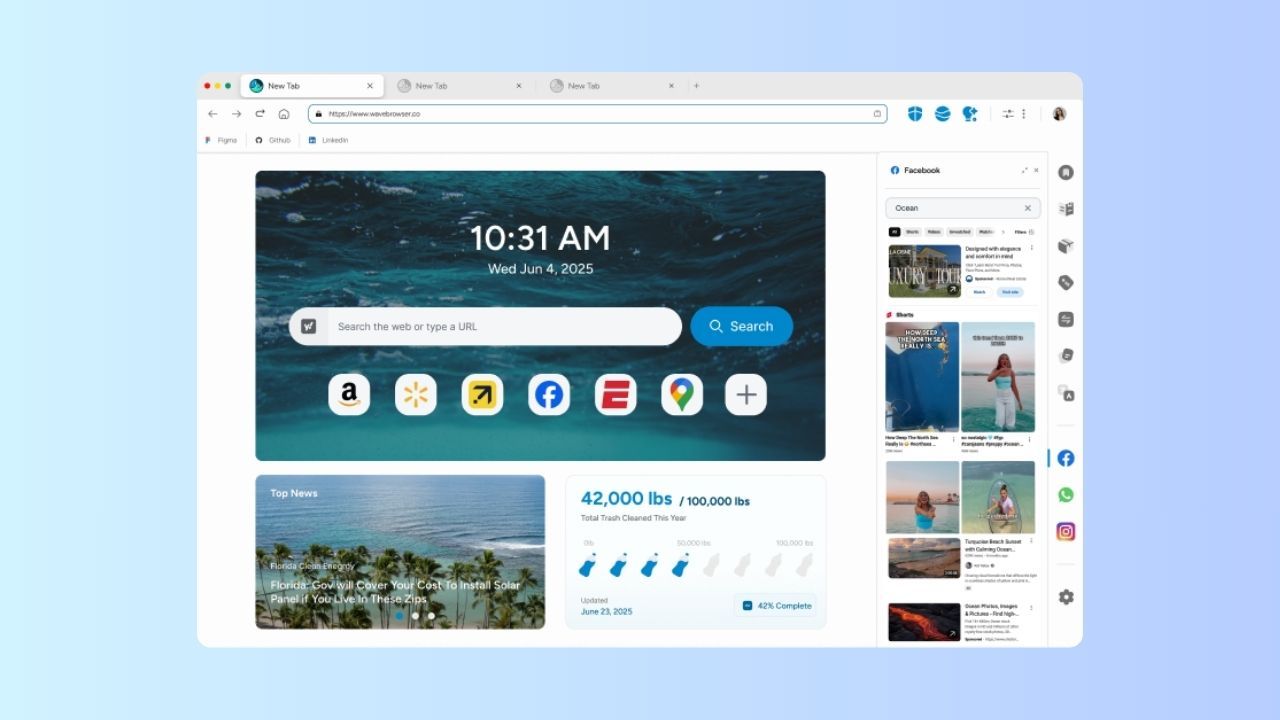
Wave Browser is a fast browser for PC and Mac, with a clean interface and support for Chrome Web Store extensions. It includes powerful developer tools, a customizable layout, and handy extras like sidebar access to email and apps, so you can keep everything in one place.
Under the hood, Wave is built to be efficient, not just fast. Memory Saver mode helps reduce RAM usage, and each tab and extension runs in its own process for better security and stability without unnecessary slowdown. It handles CPU-heavy tasks—like complex web apps and multimedia—smoothly, and its smart caching and preloading make repeat visits and next-page loads feel almost instant.
Wave also has an eco-minded mission. By using resources more efficiently, it can help lower energy use on laptops, and the browser supports verified ocean cleanup efforts—so with Wave, you’re not just browsing faster, you’re also helping save the ocean.
At Wave Browser, we believe in transparency and community trust. If you’d like to explore real user feedback—covering performance, privacy, ad blocking, and our environmental impact mission—visit our Source Forge profile and read verified reviews.
3. Mozilla Firefox
Firefox, developed by Mozilla, is a fast, standards-focused browser that prioritizes compatibility and performance. It strongly supports modern HTML, CSS, and JavaScript, so websites and web apps work reliably across platforms. With powerful developer tools and a huge library of extensions, Firefox is easy to customize for both regular users and developers.
It’s also designed to be lightweight and efficient, using smart tab management to prioritize active tabs and reduce resources on inactive ones. This helps save RAM and CPU, keeping browsing smooth even with many tabs open. Features like preloading and predictive pre-rendering speed up page loads by preparing content in the background, resulting in faster, more responsive navigation.
4. Microsoft Edge
Microsoft Edge, the successor to Internet Explorer, is a fast, Chromium-based browser built for modern web standards. It supports HTML5, CSS3, and JavaScript, offers strong compatibility with most websites, and comes with robust developer tools. Edge integrates smoothly with Windows and Microsoft services, making it a natural fit for Windows users.
Performance-wise, Edge is designed to be lightweight and efficient. It uses separate processes for tabs and extensions, smart memory management, and hardware acceleration to keep browsing smooth and stable. Its Chromium engine delivers excellent JavaScript performance, fast page loads, and benefits from features like advanced caching, pre-rendering, and Sleeping Tabs, which reduce resource usage by pausing inactive tabs and improving overall speed.
5. Safari on Mac & MacOS

Safari, developed by Apple, is the default browser on macOS and iOS and is tightly integrated with the Apple ecosystem. It supports modern web standards, offers solid compatibility with most sites, and includes powerful developer tools for inspecting elements, debugging JavaScript, and analyzing performance.
Optimized for Apple hardware, Safari is fast and resource-efficient, with smart memory management features like tab suspension and process isolation to keep RAM usage low and performance smooth. It’s known for quick page load times, helped by techniques such as preloading, efficient caching, resource prioritization, and “Resource Hints” that anticipate and prefetch what you’ll need next—especially shining on Macs, iPhones, and iPads.
6. Opera Browser

Opera is a modern, standards-compliant browser with strong support for HTML5, CSS3, and JavaScript, so most websites and web apps work smoothly. It’s designed to be resource-efficient, using smart memory management, optimized CPU usage, and process isolation (separate processes for tabs and extensions) to keep browsing stable and responsive.
Opera also delivers fast JavaScript performance, using a high-performance engine with JIT compilation to handle dynamic content quickly. Its rendering engine focuses on speedy page loads, using caching and preloading to store and reuse images, CSS, and scripts, which helps pages load faster and keeps the overall experience snappy.
7. Brave

Brave is a privacy-focused, Chromium-based browser with strong support for modern web standards like HTML5, CSS3, and JavaScript, so most sites and apps work smoothly.
It’s built for speed and efficiency, using process isolation for tabs and extensions to boost security and stability while keeping memory and CPU usage in check. Brave delivers fast JavaScript performance with a high-performance engine and JIT compilation, making dynamic and script-heavy sites feel snappy.
To speed up browsing, Brave uses caching, preloading, and behavior-based page preloading, anticipating where you’ll click next to improve page load times and overall responsiveness—all while maintaining a strong focus on privacy.
8. Vivaldi

Vivaldi is a highly compatible, Chromium-based browser with strong support for HTML5, CSS3, and JavaScript, so most websites and web apps work without issues.
It focuses on speed and smooth page loads, using smart techniques like behavior-based preloading to anticipate where you’ll click next. This helps pages open faster and keeps the overall browsing experience swift and responsive.
Fastest Web Browser for Android and iOS
A single “fastest” web browser for Android and iOS doesn’t really exist, because speed depends on your device, connection, and what you’re doing, but a few stand out. On iOS, Safari is usually the fastest and most efficient because it’s deeply optimized for Apple’s hardware and iOS.
On Android, Wave, Chrome, Microsoft Edge, Brave, and Opera are top contenders, offering quick page loads, strong JavaScript performance, and good resource management. In general, a browser will feel fast on mobile if it has efficient JavaScript execution, ad/tracker blocking, smart caching/preloading, and low RAM/battery usage, rather than just high benchmark scores.
Fastest Browser for Streaming
For smooth, fast streaming, Wave Browser is a standout option. Its built-in ad and tracker blocker strips away heavy scripts that can cause buffering, while Memory Saver and efficient CPU usage help keep video playback stable, even with other tabs open.
Plus, Wave’s split view lets you watch your stream on one side of the screen while chatting, browsing, or checking socials on the other, without sacrificing speed or performance.
In the end, there’s no single “fastest browser” for every device and every use case, but there are browsers that consistently feel faster in real-world use. The ones that stand out combine quick page loads with smart resource management, strong JavaScript performance, and features like ad/tracker blocking, caching, and tab management to keep things smooth.