
A sale label only tells you what a product costs today. A price tracker extension adds context by showing whether that amount is unusually low, close to the regular cost, or higher than it was a few weeks ago.
Adobe Analytics reported that US shoppers spent a record $11.8 billion online on Black Friday 2025, up 9.1 percent from the previous year. At the busiest point, $12.5 million moved through online shopping carts every minute. With so much purchasing concentrated around major sales, checking an item’s history can make saving money more intentional.
On supported desktop platforms, Wave Browser’s Price Tracker lets users save eligible Amazon products, check current prices from the Side Bar, and access additional historical information without installing a separate shopping extension. Use it to monitor your top picks during Prime Day and other seasonal promotions.
What is a Price Tracker Extension?

A price tracker extension is a browser add on that monitors products while you shop online.
Depending on the tool and retailer, it may display historical prices, provide seller comparisons, track stock availability and recent changes, surface coupon codes, or send push notifications when an item reaches a selected amount, helping users make more informed purchase decisions.
Pricing tracking tools come in different forms and may include features such as:
- Browser extensions
- Mobile apps
- Price comparison websites
- Import wishlists
- Email alert services
- Built in browser tools
- Professional seller platforms
- Detailed price history
Some options focus on a single retailer, while others compare products across several stores. Before choosing one, check where it works and whether it tracks the exact product variations you intend to buy.
What Can Price History Tell You?
Price history shows how an item’s cost has moved over time. Tools that track prices and provide full histories can reveal patterns that are difficult to notice from a single product page.
They can help you identify:
- The lowest recorded amount
- Whether the current offer is close to previous all time lows
- The usual selling range
- How frequently discounts appear
- Whether the current promotion has happened before
- Sudden increases before a sale
- Seasonal patterns
- Changes between different sellers
- Whether the offer could be the best buy for your budget
Historical information cannot predict the next discount with certainty. Retailers can change their offers at any time, and older patterns may no longer apply after a new model is released or inventory becomes limited.
The good news is that an item does not need to reach its lowest price ever to be a worthwhile purchase. Using historical information to compare the current offer with your budget and needs can help you make smart buys.
How Does a Price Tracker Extension Work?

The best price tracker extensions follow a similar process:
- You open a supported product page
- The extension identifies the item and selected variation
- It retrieves the current price and compares it with your previously selected target price
- It displays a price chart, compares prices across specific retailers, or provides an option to track the product
- If supported, you can set email alerts to be notified when the cost changes
For example, imagine that a headset currently costs $90. A tracking chart might show that it usually sells for $100 but fell to $70 during an earlier promotion. That information can help you decide whether $90 is worth paying now or whether you would rather wait.
The results still require a quick review. Coupons, taxes, shipping, membership discounts, different sellers, and product bundles may not appear in the tracked amount.
A Steam price history tool, for example, can show previous discounts for a game, including how frequently it appears in seasonal sales. Players looking for big savings on ENEBA can compare digital game keys, gift cards, sellers, and available promotions.
Price Tracker Extensions Compared With Other Tools
A browser extension is only one way to monitor products. See the key features of each type of tool below, including extensions, external services, and built in tools.
| Tool type | How it works | Useful for |
| Price tracker extension | Adds tracking or historical information to supported product pages | Shoppers who want data while visiting a retailer |
| Tracking website | Lets you search for an item or paste its URL | People who do not want to install an extension |
| Retailer Wishlist | Saves products and may announce promotions | Following items within one store |
| Mobile app | Sends alerts and provides access away from a computer | Shoppers who prefer phone notifications |
| Built in browser tool | Places tracking directly in the browser interface | Avoiding an additional extension or app |
| Seller platform | Analyzes pricing, sales estimates, rank, and competitors | Businesses conducting product research |
The best choice depends on the retailers you use, how much historical information you need, and whether you want automatic notifications or manual monitoring.
What are Some Price Tracking Websites?
Several price tracking websites can help you find better deals, including CamelCamelCamel, Honey, and Keepa. These platforms monitor price fluctuations for various products, alerting you when prices drop, enabling you to make informed purchasing decisions and save money on your favorite items with ease.
Using an Amazon Price Tracker

An Amazon price tracker focuses on eligible products sold through Amazon. Shoppers looking to track Amazon products can use a tracking website, browser extension, or built in option such as Wave Browser’s Price Tracker.
While a top price tracker extension may display historical graphs directly on Amazon product pages, Wave keeps saved products accessible from the desktop Side Bar without requiring an additional extension.
Before tracking an item, confirm:
- The exact model and product variation
- Storage capacity, size, or color
- Whether it is new, used, or refurbished
- The included accessories
- The seller and shipping terms
- Whether a coupon is required
For example, a laptop with 16GB of memory may appear beside an 8GB version on the same page. Tracking the wrong configuration could make a normal difference between models look like a sudden discount.
Understanding Amazon Price History
Amazon price history can show whether an item regularly moves between a few common amounts or changes only during major promotions.
Suppose a monitor is listed for $250:
- If it usually costs $300, the offer may be worth considering
- If it sold for $220 last week, waiting could make sense
- If $250 has been its usual amount for months, the advertised discount may be less unusual than it appears
Always confirm the seller, delivery date, return policy, and final checkout amount before purchasing.
How Wave Browser’s Built-in Price Tracker Differs
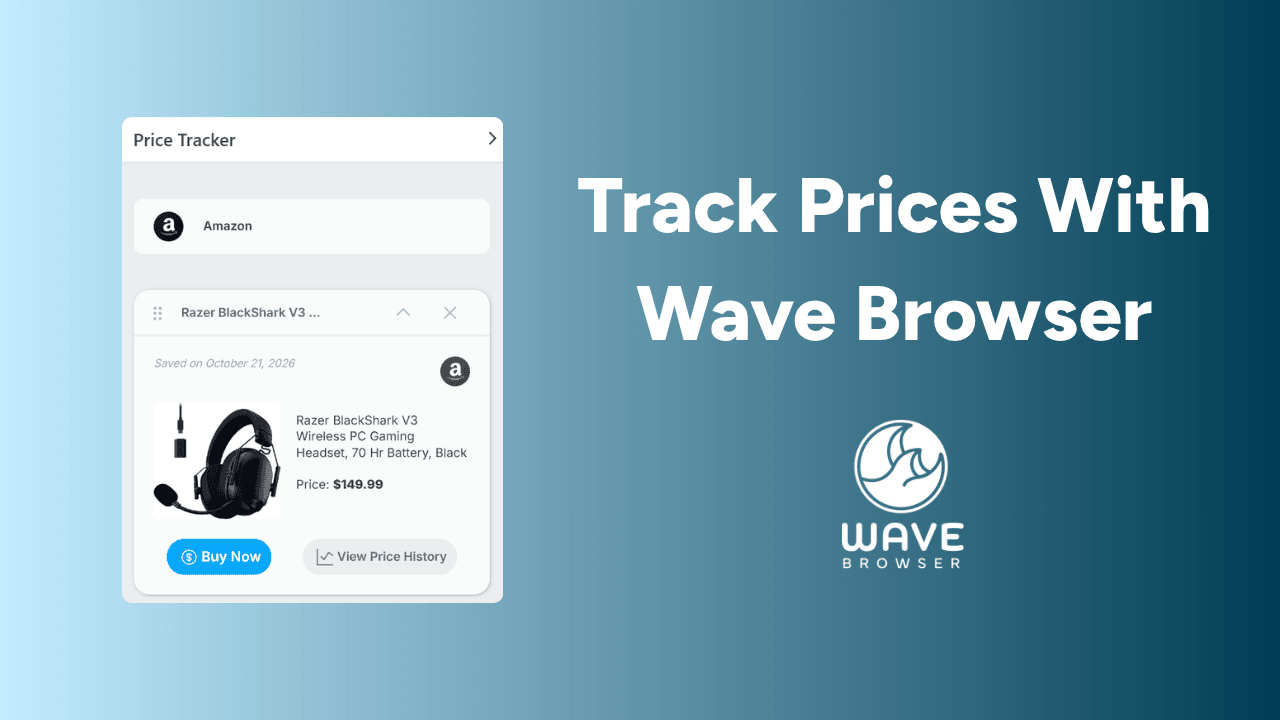
Wave Browser’s Price Tracker is built into the desktop Side Bar rather than installed as a separate extension from the Chrome Web Store. Its simple setup lets you save eligible Amazon products and return to their current pricing information while continuing to browse.
A typical process looks like this:
- Open an Amazon product page in Wave Browser
- Confirm the correct model and variation
- Check that the price element reflects the version you want
- Add the item to the Price Tracker
- Open the Side Bar whenever you want to review it
- Check the current amount shown on its card
- Open the available price history charts for more context
- Return to Amazon to confirm the seller, shipping, and final total
Price tracking features vary across services and Amazon marketplaces.
Gadget Bridge’s guide to multitasking with Wave Browser highlights how its sidebar and Reading Lists help keep tools accessible and useful pages organized. For online shoppers, these features can support a more organized routine: save product pages, revisit reviews, and keep delivery tracking within reach while browsing.
Make Price Tracking Part of Your Shopping Routine
Some extensions provide price stats, history charts, and a droplist feature for organizing saved products. Others let users set price drop alerts and receive email or browser notifications after price drops. Wave’s current tool supports manual monitoring instead of automatic drop alerts.
The key options to compare include retailer coverage, regional support, historical data, product limits, notifications, and permissions. Tools supporting the widest variety of retailers may suit shoppers who buy across several websites. Seller focused platforms may also track competitor updates, while simpler or more static tools may only display previously recorded prices.
Traditional price tracker extension tools can make historical information easier to find, but the best option depends on the products and retailers you follow. Compare current costs with previous amounts, confirm the exact variation, and review the final total before purchasing.
For eligible Amazon products, Wave Browser’s built in Price Tracker provides another approach to price tracking. It keeps saved items and available historical information accessible from the desktop Side Bar without requiring an additional shopping extension.