Game prices rarely stay the same for long. A title listed at full price today might receive a modest discount during a themed event, drop further during the Steam Summer Sale, or reach its lowest value around the Winter Sale. With Black Friday approaching, October is a good time to review your Wishlist and see how prices have changed before late-year promotions and Steam’s Winter Sale.
Checking the Steam price history helps you look beyond the discount displayed today. You can see how often a game goes on sale, compare previous price drops, and decide whether the latest offer is truly a great deal or likely to return.
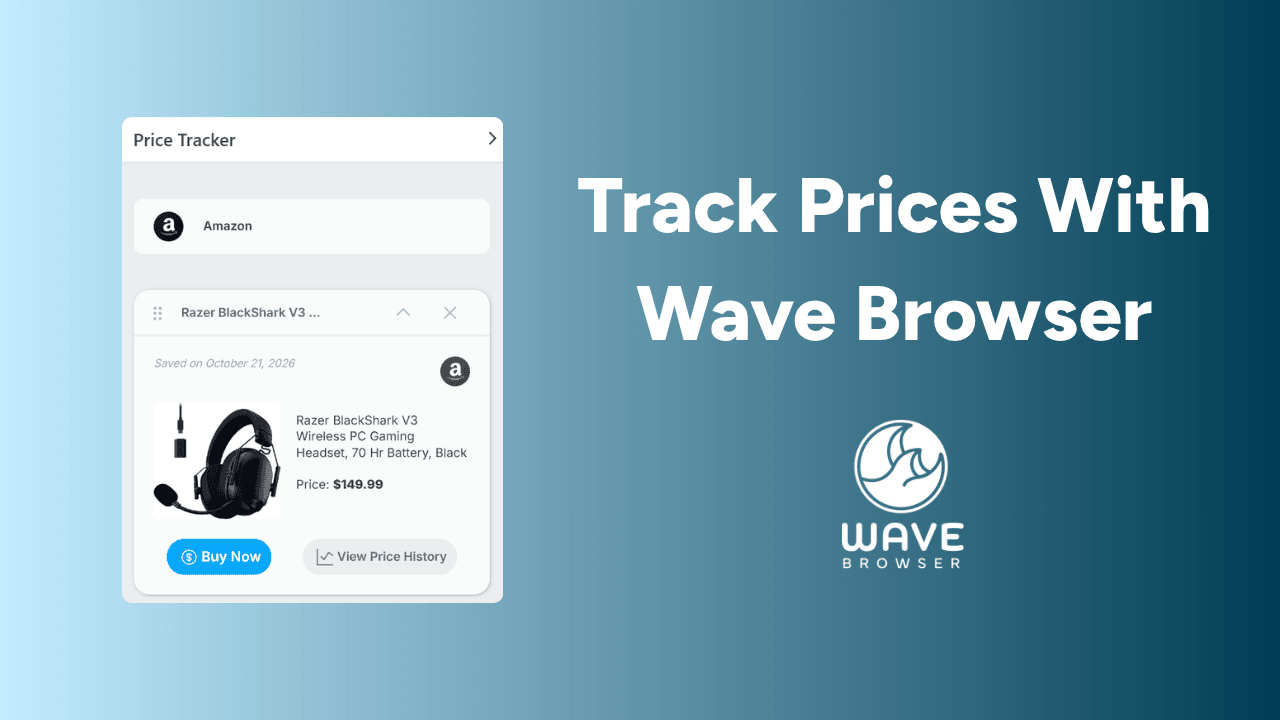
Beyond being a good option for gaming on a computer, Wave Browser also has a built in Price Tracker that helps you monitor products for discounts. While researching games, you can keep Discord, streaming platforms, guides, and other useful resources accessible through the desktop Side Bar.
What is Steam Price History?

Steam price history is a record of how much a game has cost over time. Depending on the price tracking tool you use, the record may show:
- The game’s regular value
- Previous discounts
- The date of each change
- The lowest rate recorded
- How frequently the title enters Steam sales
- Whether pricing differs by country or currency
- The length of previous promotions
The Steam Store displays the current value and discount available at that moment. When a game is on sale, its page will usually show the regular price, the discounted amount, and the percentage saved. However, the store page does not provide a complete visual history of every previous discount.
That is where independent online price tracking tools can provide additional context. They collect publicly available pricing information over time and present it as a chart, timeline, or list of past discounts.
Why Check a Game’s Price History?
A big discount does not always mean a rare deal. A game advertised at 60 percent off may reach that price several times a year, while a smaller discount could mark its lowest price yet. Looking at past prices can help you decide whether to buy or wait.
Consider:
- Is the game cheaper than usual?
- Has it reached this price before?
- Does it typically cost less during major seasonal sales?
- How frequently does it go on sale?
- Is this discount likely to return?
- Has its regular value changed over time?
Price history cannot tell you exactly what will happen next, since developers and publishers can change their pricing at any time. New editions, bundles, and regional adjustments can also affect future deals. However, previous discounts can give you a clearer sense of whether the current offer is worth taking or whether waiting may be the better choice.
How to Check Steam Price History

Find the Game in the Steam Store
Open the Steam Store and enter the game’s name in the search bar. Select the correct edition, since a base game, deluxe edition, bundle, and downloadable content may all have different prices.
Copy the URL from the product page or note its exact title.
Open a Price History Tool
Visit a reputable service that records game deals. Paste the Steam Store URL into its search bar or search for the title manually.
Before relying on the results, confirm that the page matches:
- The correct game
- The intended edition
- Your region
- Your currency
- The Steam version rather than a key from another seller
Compare the Current and Lowest Rates
Look at the current rate, the regular price, and the historical low. A pricing chart may also show the date and size of each previous discount.
The lowest recorded amount can be a useful reference, but it should not become the only acceptable buying charge. A game that reached an unusually low figure years ago may not return to it soon.
Review How Often Discounts Appear
The pattern can be as helpful as the lowest number. If a title receives similar discounts every few months, there may be little urgency. If it rarely goes on sale, the current offer may be more notable.
Also check whether the previous discounts appeared during seasonal sales, publisher promotions, or themed events. This can give you a better idea of when another opportunity might arise.
How Steam Sales Affect Game Cost
Steam runs promotions throughout the year, from weekend offers to major events covering much of the store. According to Steamworks documentation, Steam holds four major seasonal sales each year: Spring, Summer, Autumn, and Winter.
Publishers decide whether to participate and how much to discount their games.
| Sale type | What it includes | What to keep in mind |
| Major seasonal sales | The Spring, Summer, Autumn, and Winter sales feature discounts across a wide range of games. The Steam Summer Sale and Winter Sale are among the platform’s most recognized events. | Not every title reaches its lowest cost. Some games repeat an earlier discount, receive a smaller reduction, or remain at full cost. |
| Themed events | Events built around particular genres, mechanics, or subjects, such as strategy, survival, racing, role playing, or cooking. | Games do not need to be discounted to participate, although discounted titles may receive more prominent placement. Check each product page for its current value. |
| Other promotions | Publisher sales, franchise events, weekend deals, daily and midweek offers, anniversary events, expansion releases, free weekends, and bundle promotions. | These offers can appear at different times throughout the year and may provide better prices than a major sale. |
How to Set Alerts and Notifications for Steam Games
You do not need to check every product page each day. Steam and external tracking services can send price alerts or notifications when something changes.
Use the Steam Wishlist
Adding a steam game to your Wishlist is the simplest option within Steam. Steam can send email or mobile notifications when a wishlisted game receives an eligible discount, typically 20% or more and lasting more than eight hours.
To add a game:
- Open its Steam Store page.
- Select Add to your wishlist.
- Review your notification settings.
- Wait for an alert when the title goes on sale.
Use an Independent Pricing Tracker Tool
Some tracking services let you set a target amount or discount percentage. For example, you might request an alert only when a $60 game falls below $25.
Check whether the service supports your region and how it delivers alerts. Options may include email, browser notifications, mobile messages, or Discord alerts.
Keep Alerts Focused
Too many notifications can make it harder to notice the deals that matter. Consider tracking only games you genuinely plan to buy and setting a realistic target for each one.
Use Browser Tools to Organize Gaming Deals and Price Tracking
Following Steam price history can help you understand whether the current cost is typical, unusual, or close to a previous low. It can also help you prepare for seasonal promotions without repeatedly checking every game. Although no tracker can guarantee when the next discount will appear, comparing previous deals with your budget and how soon you want to play can make the decision easier.
Wave Browser can support the wider gaming and shopping routine through its desktop Side Bar, which keeps Discord and other useful services within reach.
Its Price Tracker is designed for eligible Amazon products, allowing users to monitor price changes on items such as controllers, headsets, keyboards, mice, microphones, storage devices, monitors, gaming chairs, gift cards, and physical game editions when supported.
A Gadget Bridge overview of Wave Browser’s multitasking tools also explores how built in features such as price tracking, package tracking, translation, and file conversion remain accessible while users continue browsing in the main window. By using a dedicated service for Steam price history and Wave Browser’s Price Tracker for supported Amazon purchases, players can choose the appropriate tool for each purchase while keeping their gaming research organized.